Retirement tributes
Send them off with stories worth keeping.
A retirement video is a chance to say what a farewell card cannot fit: the small kindnesses, the advice that stuck, and the moments that made working together better. Gather a mix of voices and keep the request easy for a busy team.
Start your video giftFree to collect and preview. Pay once for the finished video: $19 up to 10 minutes, or $29 over 10 and up to 20 minutes, including opening and closing cards. See pricing details.


Invite people from across their working life
Include current teammates, former colleagues, mentors, and people they helped along the way. If the celebration also includes family, ask one person to coordinate that group. Keep a guest checklist so quiet contributors do not get overlooked.
Choose the audience before collecting stories
Tell contributors whether the video will be shown to a small team, a whole company, or family and friends. Ask them to avoid confidential work details and jokes that would be uncomfortable in that setting. A workplace gift can be warm without putting anyone on the spot.
Retirement message ideas that sound like you
Trade a general congratulations for one real detail. Mention what you learned, a moment they helped you, or something you hope they enjoy next. Keep each contribution within the 30-second FromUs message limit.
- The best advice you gave me was...
- You made our team better by...
- My wish for your first year of retirement is...
Build a beginning, a middle, and a goodbye
Open with a welcome from the organizer. Follow with memories and thank-you messages from different teams. End with a personal wish for what comes next. Review the order and audio in the free preview before making the finished gift.
Prepare for the celebration
Finish before the event day if you can. Download the completed video and test it with the screen and speakers you will use. Send the retiree the watch link afterward, and remind them to download a copy before the date shown on the page.
Make it feel like them
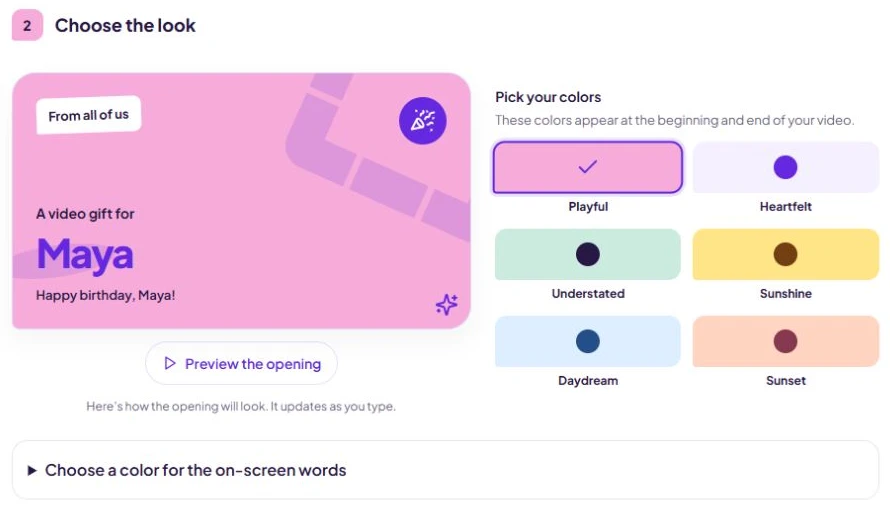
Choose a color mood, then preview the opening with their name and your title. Here’s where you’ll find it when you start a gift. See the step-by-step help.
An invitation you can copy
Replace the brackets with your details before sharing.
We are making a retirement video for [name]. Please record a short thank-you, a favorite work memory, or a wish for their next chapter by [date]. It will be shown to [audience]. Add your message here: [contributor link].
Does every coworker need an account?
No. Contributors open the invitation link on their phone or computer and add a message without creating an account or installing an app.
Ready to bring everyone together?
Create your gift, send the invitation link, and let everyone add their message. You can arrange and preview before you pay.
Create your gift